
Edit a typo in any image.
a variable processing time. Same font. No Photoshop.
No credit card required to start. Sign in for a free edit.
By clicking Generate, you confirm you own or are licensed to edit this image and that the edit is not intended to deceive a third party — including fake refund or transaction proofs and email or chat screenshots altered to falsify sender, content, or timestamp.
We do not process IDs, passports, certificates, bank records, receipts, payment proofs or chat screenshots. See our Acceptable Use Policy.
Edit typo in image fixes a misspelled word on a rendered image — screenshot, poster, packaging, social post — using AI. The AI matches the original font, color and stroke so the correction is visually undetectable; no Photoshop, no font hunt, no redesign.
Three real scenarios to edit a typo in an image.
Each one is the moment people search this exact keyword — the typo is already published or about to be, and rebuilding the design is overkill for one letter.
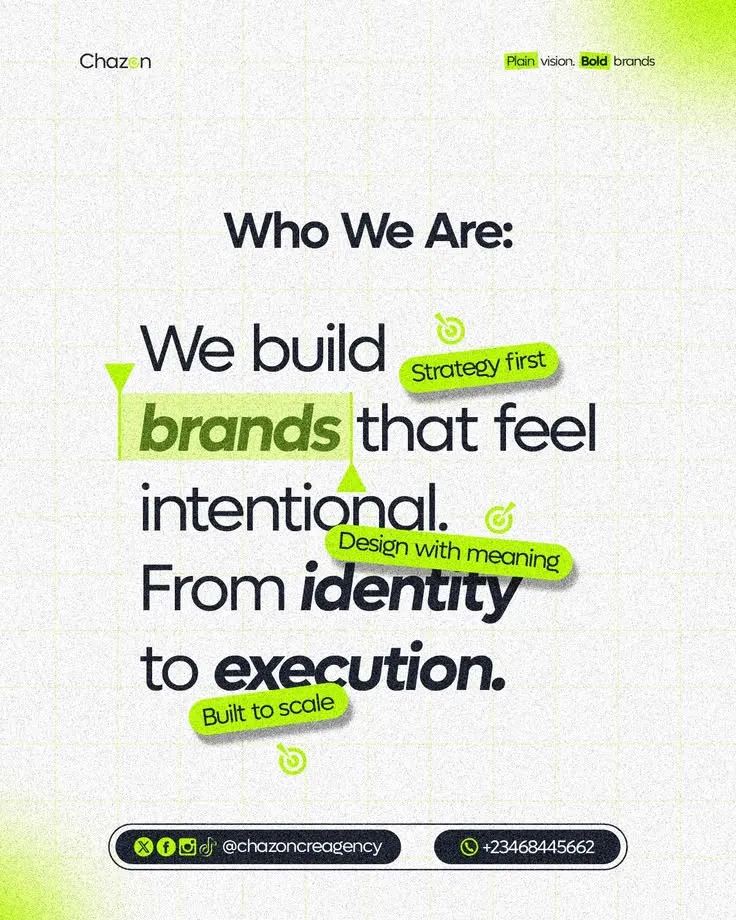 Before
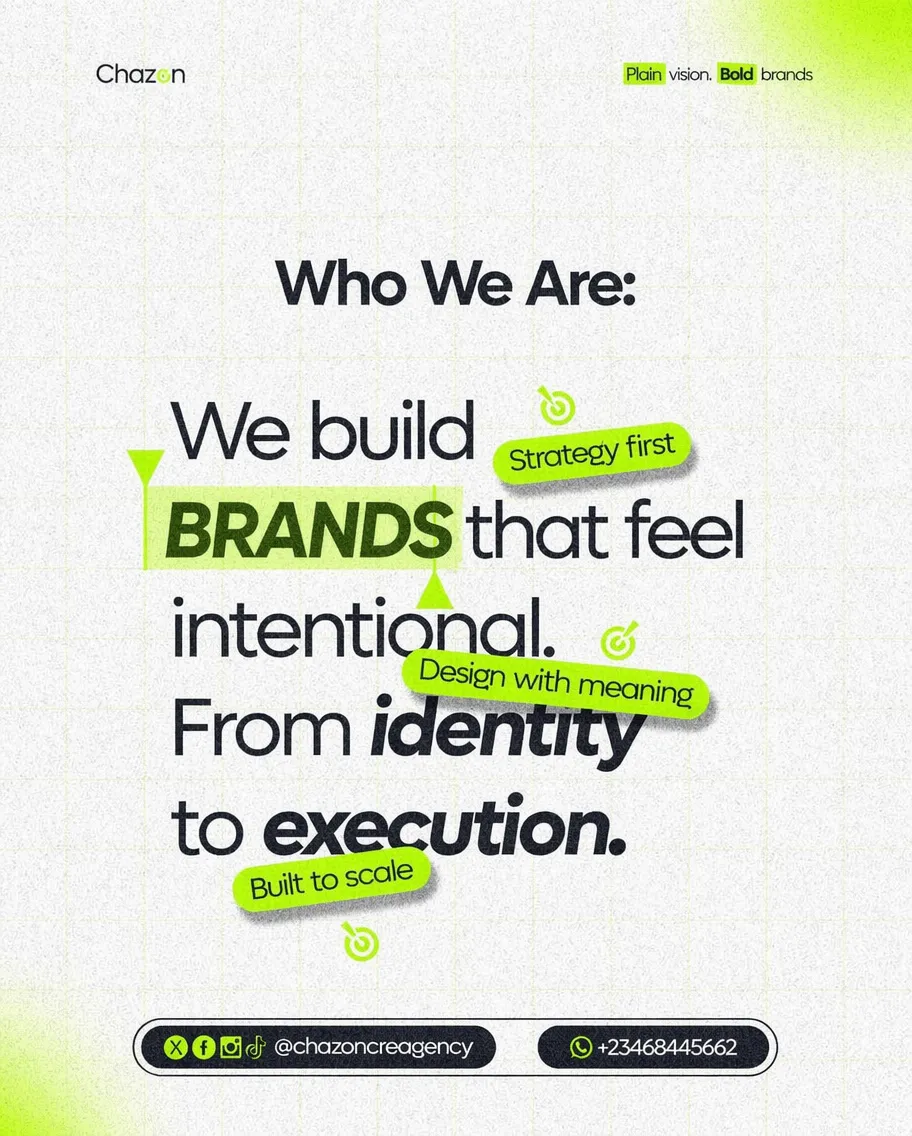 After
Edit a casing typo in a brand poster minutes before it goes live
The agency's «Who We Are» poster is ready to post — but the brand style guide says the highlighted keyword must be set in caps, and the artwork shipped with a lowercase «brands». The designer is offline and the source file is on their machine. Type the lowercase word, type the uppercase fix, and the AI re-renders it in the same weight and highlight bar — the grid texture, badges and layout are intended to remain visually consistent. Compare the result with the original before publishing; AI can change surrounding details.
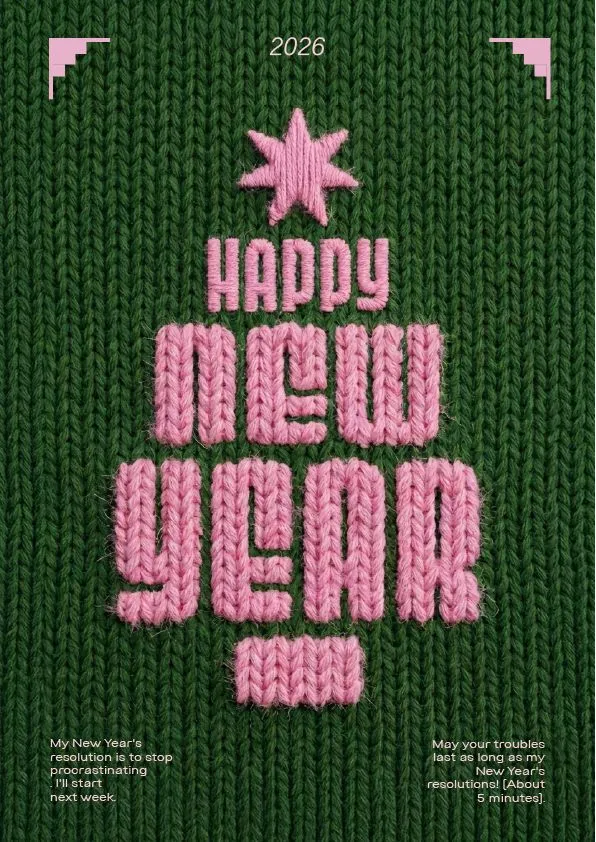 Before
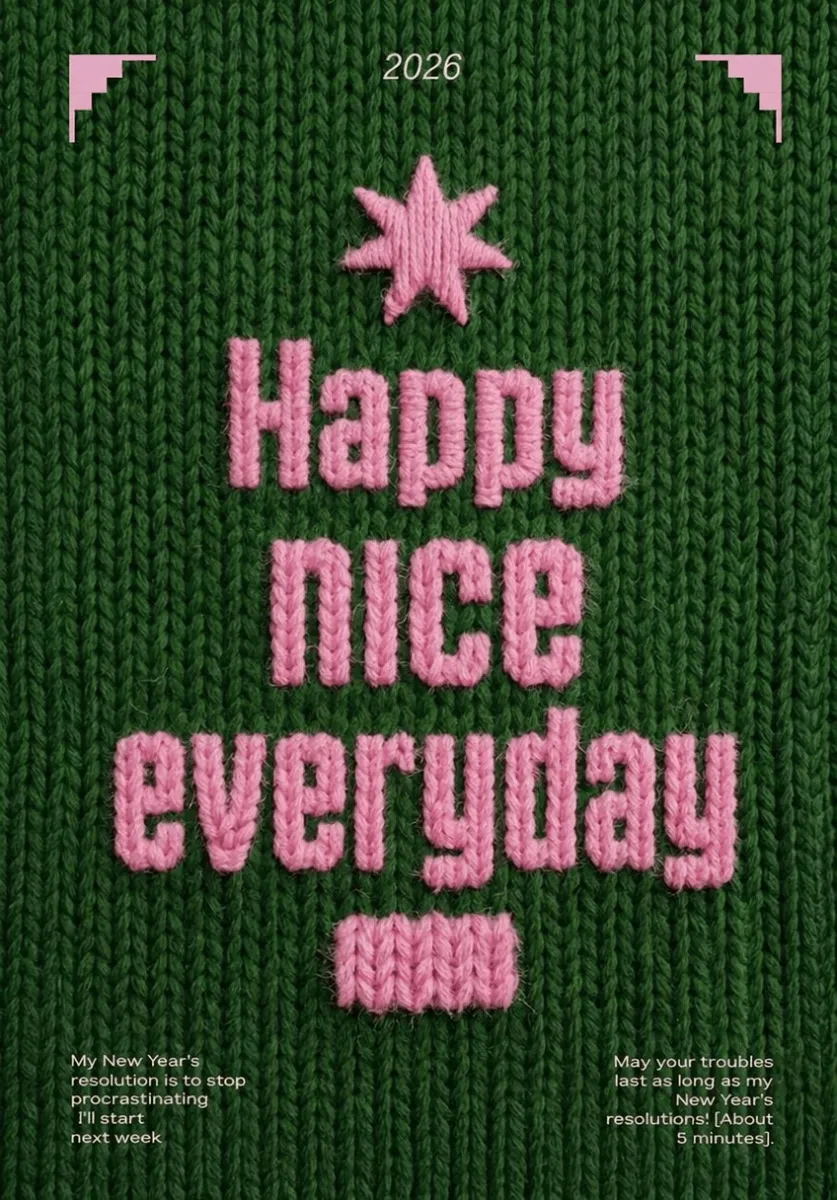 After
Edit a typo when the whole knitted line is wrong — no re-stitching
The knitted 2026 artwork turned out beautifully — but the client signed off on the evergreen slogan, not the holiday one. Sometimes the «typo» is the entire line. Recreating embroidered yarn lettering by hand is a day of work; instead, type the stitched words and the replacement, and the AI re-renders the new line in the same pink yarn texture, stitch shadows included — the sweater weave behind it stays untouched.
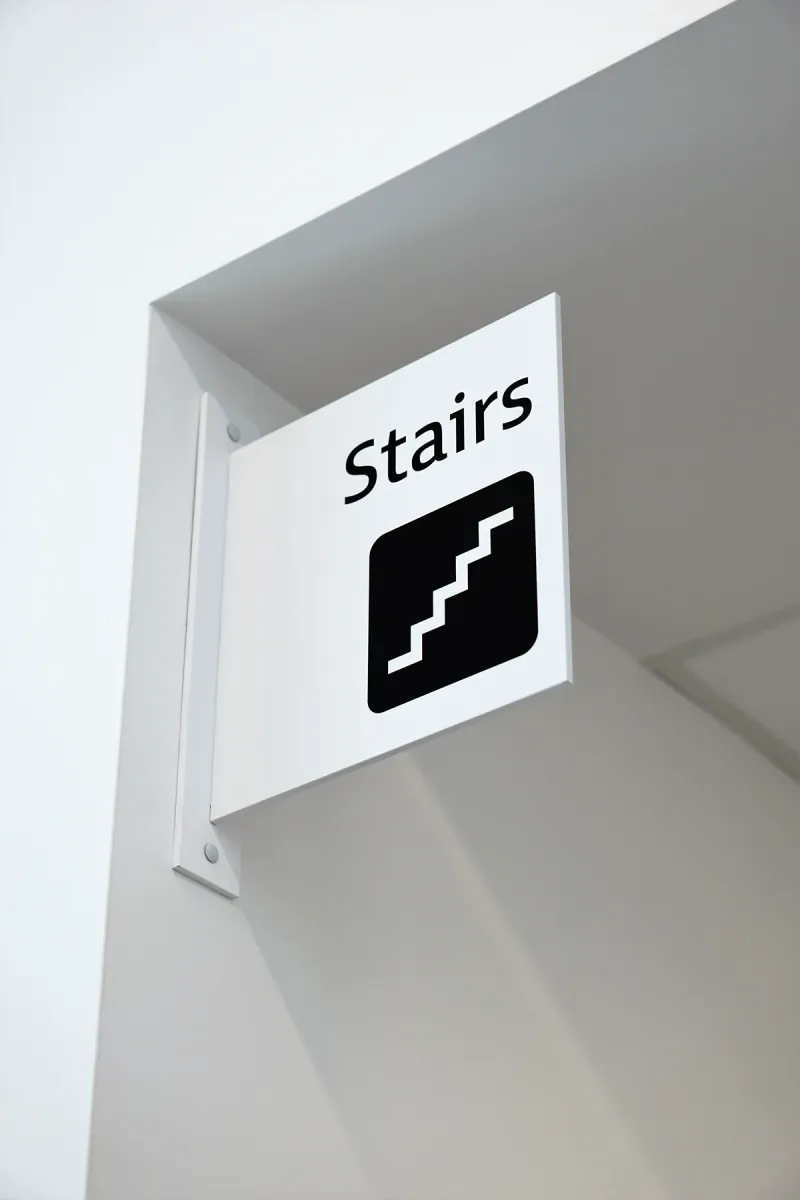 Before
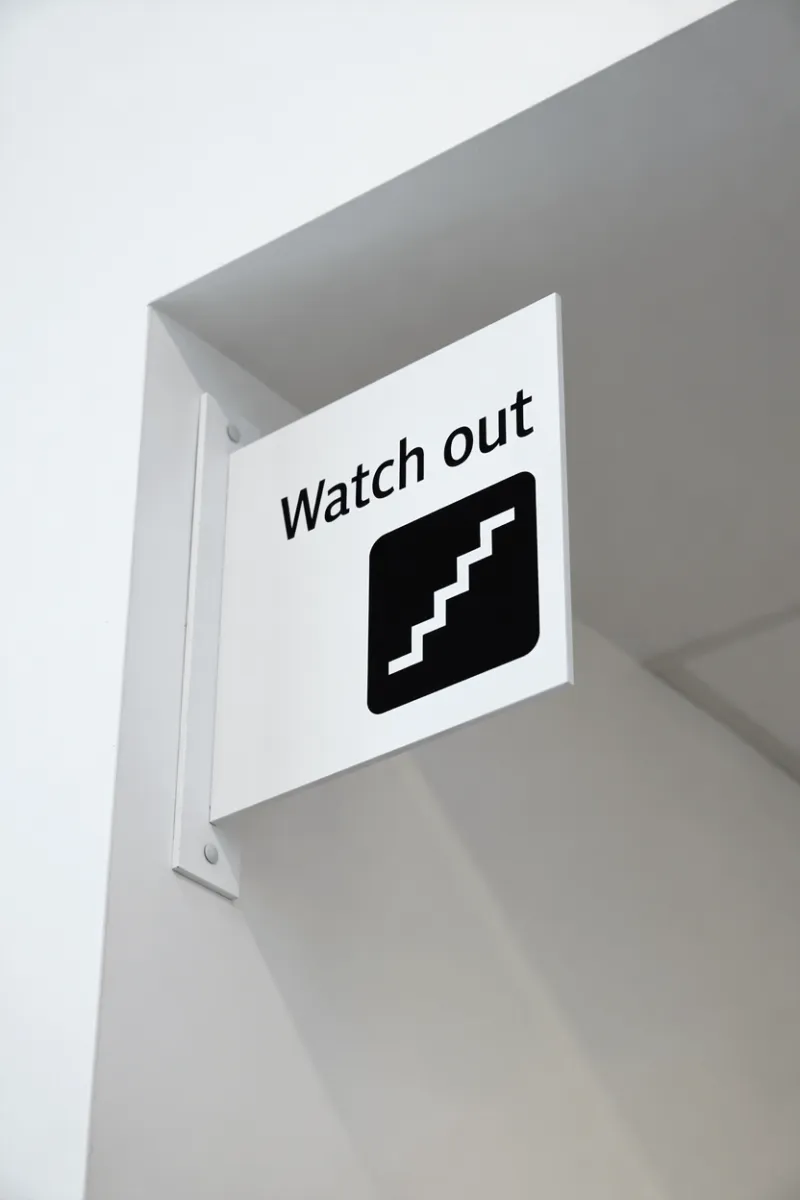 After
Edit the wrong word on signage photos — fix the typo without a reshoot
Your facility guide uses a real photo of the stairwell sign — but for the safety section, the sign in the shot needs to read «Watch out», not «Stairs». Reshooting means going back on site with a camera; manual retouching fights the viewing angle and wall shadows. Type the old word and the new one: the AI matches the sign's font and perspective, and the pictogram, mounting bracket and lighting stay exactly as photographed.
What does it mean to edit a typo in an image?
To edit a typo in an imageis to fix a single misspelled word — “definately” → “definitely”, “recieve” → “receive”, “seperate” → “separate”, an Oxford-comma slip, a wrong year — on a finished image without rebuilding the whole design. The AI samples the typography of the misspelled word from the surrounding pixels, inpaints the original characters out, and re-renders the corrected spelling in the exact same font, weight, color and shadow. The rest of the image — every other word, the background, the layout — is intended to remain visually consistent. This is the smallest-footprint workflow for the most common embarrassing situation: you just hit publish and immediately spotted the typo. Fix using AI, repost the corrected version. Compare the result with the original before publishing; AI can change surrounding details.
The same operation under its other common name is changing text in an image, and when the typo is inside a UI capture rather than a graphic, editing text in a screenshot is the page tuned for system fonts and chrome. And when the misspelled word was written by hand — a recipe card, a labelled diagram, a note on a whiteboard — there is no font to fall back on at all; editing text in handwritten notes explains what the engine samples instead, and whose handwriting you must not touch.
Where typo fixing actually saves the day
- ·Print proof window. You catch a typo at the proof stage but the source design file is unavailable. Export a PDF page as PNG, JPEG or WebP first, upload that image, and enter the original phrase and the correction. Review the output carefully before returning it to the print workflow; editing an image does not update the source PDF.
- ·Already-published social posts. You posted to LinkedIn / Instagram / X and a colleague DMed you the typo within the first hour. Most platforms let you replace the media on an existing post — replace with the corrected version before too many people screenshot the bad one.
- ·PowerPoint / Keynote slides exported as PNG. When the slide deck is already shared as a PDF or screenshot collection (event deck, board pack), reopening the source PPT just to fix one typo is overkill. Edit the exported image directly.
- ·Documentation screenshots. A typo in a UI screenshot in your help-center article. The source UI may have been fixed weeks ago but the screenshot is stale. Patch the screenshot in place.
Four real-world typo-in-image moments where you need a 30-second fix
Typos in images are uniquely embarrassing because the traditional fix path is so disproportionate to the problem. These are the situations creators, marketers and product teams run into where editing the typo in the image in place beats the alternatives (re-design, re-print, re-upload, ignore).
1. Spotted in a social post after it’s already going viral
You launched the campaign image at 9 AM, posted it on LinkedIn and X, and someone replies at 11 AM pointing out that «definately» should be «definitely». The post is at 80 engagements and you don’t want to delete and re-post (which would lose those signals). Edit the typo on the existing image, save the corrected version under the same filename, and replace the image on the post — the engagement metrics stay attached.
2. Slide deck or webinar replay heading to print / upload
You recorded a webinar last week. The replay is being uploaded to YouTube and the marketing slide deck PDF is being distributed to attendees. Someone spotted a typo on slide 7 and on the cover slide. The original Keynote / PowerPoint is in a colleague’s laptop on vacation. Edit text in the image of each slide to fix the typos, splice the corrected images back into the slide PDF, re- upload — without waiting for the source file to come back.
3. Print collateral about to ship to a vendor
The brochure / poster / packaging artwork was approved and handed to the print vendor yesterday. This morning the proof comes back and there’s a typo in a product name. The designer is unavailable; the vendor needs the corrected file in 2 hours to hit the production window. Edit text in the image to fix the typo on the press-ready rendered file — same brand font, same exact color — so the new file drops in cleanly without re-routing through design review.
4. AI-generated marketing copy that you noticed too late
You generated a batch of 12 marketing creatives via an AI template tool. After publishing 4 of them, you notice the AI hallucinated a product name or invented a feature you don’t ship. The remaining 8 unpublished creatives still have the wrong text baked in. Edit typo in each image to fix the wrong product name in place — much faster than re-prompting the AI 8 times and hoping it stays on template.
Frequently asked questions
How do I fix a typo in an image without redoing the whole design?+
Upload the image, type the misspelled word exactly as it appears, type the correct spelling, and download. The AI replaces only the misspelled glyphs and rebuilds the underlying background pixels via inpainting — the rest of the design is intended to remain visually consistent. Processing time varies by image and provider load. The first edit is free, no watermark. Compare the result with the original before publishing; AI can change surrounding details.
Can I fix a typo in a poster that's already at the printer?+
If the print run hasn't started yet — yes, fix the typo in the source image and re-upload to the printer. Most print shops accept a corrected version up to ~24 hours before the run. The 2K output is sharp at A4 / Letter; for oversize formats (A2+) work from your original design source. If the run already happened, you're past the editing stage; this tool is for catching typos in the proof window.
How do I fix a typo in a screenshot I already published on social media?+
Edit the typo, download the corrected screenshot, then on Twitter / X repost the corrected version (the platform doesn't allow editing media on existing posts). On Instagram, replace the image inside the same post via Edit → Edit cover. On LinkedIn, you can edit the post and replace media. The typo fix itself processing time varies; the longest part is the platform's edit flow.
Will the typo fix change the spacing of the surrounding text?+
Usually no. The AI keeps the corrected word at the same character height as the original and tries to fit it in roughly the same width. If the correction is significantly longer (e.g., "definately" → "definitely" adds one character), the AI may shift adjacent characters by 1–2 pixels to maintain the original layout. For correction-vs-rebuild discipline, that's usually invisible to a casual reader.
Can I fix multiple typos on the same image in one edit?+
One supplied typo is corrected per generation and each run uses 1 credit. Three separate typos therefore need three runs. Enter the whole misspelled word and the full correction, then inspect the result before continuing. There is no multi-box correction mode. If a document needs many precise changes, editing the original source file is usually the better option.
Is this faster than fixing a typo in Photoshop?+
Significantly. Photoshop typo fix workflow: identify the original font (5 min via WhatTheFont or browsing through installed fonts), install the font if not already (2 min via Adobe Fonts), select and delete the misspelled word (1 min), retype with the right spelling (30 sec), color-match if the font slightly differs (2 min). Total: ~10 minutes per typo. EditText: type the misspelled word, type the correct one, click Generate. a variable processing time per typo, no font ID, no installation.
Will fixing a typo trigger any visible re-render artifact?+
When the AI samples the original font correctly — and typos are usually in plain text, not stylized display fonts, which is the easy case (across all edits, 92% completed in our own October 7–14, 2026 measurement) — the corrected word is visually indistinguishable from the rest of the line. The most common edge case is letter-spacing changes when the corrected word is significantly longer or shorter; in those cases the letter spacing of the surrounding text adjusts smoothly so the line still reads cleanly.
Can I edit typos in images that include both English and non-Latin text?+
Yes — edit typo in image is language-agnostic for the sampling step. The AI samples the surrounding pixels regardless of script. Latin-script typos (English, Spanish, French, Vietnamese) are most reliable. CJK character substitution works for printed-style fonts. The harder case is calligraphic East-Asian scripts, where individual character shapes carry more nuance — usually needs a second pass.
how do i edit text in a png image for free?+
You can edit text in a PNG image for free using online tools that automatically maintain the original font and style. EditText is one such tool that works efficiently without requiring a download or subscription. To start, you simply upload your PNG image to EditText, which supports files up to 10 MB. It uses generative inpainting to replace the words while preserving the background seamlessly. Unlike manually editing in software like Photoshop, which can be more complex and require font matching, the tool uses the surrounding area to intelligently guess the text style. Another option is Pixlr, a free online photo editor that also allows text editing within images, though it may require more manual input to achieve the same font and style consistency. Pixlr offers a range of tools similar to traditional desktop software and supports layers and advanced editing. After editing, ensure to save your work in the PNG format to maintain transparency, which is a notable feature of PNG files thanks to their alpha channel preservation. This ensures no loss of quality or unwanted background when the edited image is used elsewhere.
how do i edit text in a jpg image online for free?+
Editing text in a JPG image online for free is possible using tools like EditText and Photopea, which allow you to modify text without downloading any software. The tool offers an easy-to-use web interface where you can upload your JPG file, and it automatically detects and replaces text while preserving the original font, color, size, and background. This tool uses generative inpainting, a process that fills in text areas by sampling the surrounding pixels and ensuring that the edited text blends seamlessly with the existing image structure. The result is a high-quality edit without obvious signs of alteration. Photopea, on the other hand, simulates many of Photoshop’s features online, allowing for more manual control but requiring a bit more design skill to match font styles manually. The tool is more automated and outputs 2K results within about 30 to 60 seconds, making it ideal if you need quick and consistent edits. Both tools are free, but Photopea may require you to deal with ads unless you opt for a paid version. If you intend to further edit the image, consider saving it in PNG format to avoid lossy JPEG recompression artifacts.
how do i edit text in a png image without photoshop?+
To edit text in a PNG image without Photoshop, use an online tool like EditText, which maintains the original font, color, and background. The tool allows you to upload a PNG file and replace text while preserving the original styles through generative inpainting. Generative inpainting fills in the text area without leaving a hole, which is crucial when you're trying to keep the integrity of the surrounding design. Unlike traditional image editors that require manual selection and font matching, the tool automatically samples font weight, color, and angle from the existing image, saving you substantial time. Another alternative is Pixlr X, a less automated but flexible browser-based tool that requires you to manually overwrite text but offers a wide array of font options, though matching the original font can be challenging if you don't have the exact match installed on your system. While both options retain quality, the tool is particularly efficient for fast edits since it returns results in about 30 to 60 seconds with resolution up to 2K. Opt for PNG as your output format to preserve the alpha channel and avoid the compression artifacts common in JPEGs. This is especially important if you plan to make further edits or need transparency in your images.
why does text look different when i edit a png image?+
Text can look different when editing a PNG due to several factors, including subpixel rendering and the availability of system fonts. When you modify text in an image, the rendering might not replicate the original due to differences in how text is displayed on different devices and applications. Subpixel rendering is a technique that uses the individual pixels of an LCD screen to increase the apparent resolution of the text. However, this means that any change or movement of the text can lead to differences in appearance, especially when viewed at different resolutions or zoom levels. Additionally, if your editing tool uses a different font library than the one used to create the original text, discrepancies can occur. For instance, Adobe Fonts and Google Fonts have different sets of available fonts, which can lead to unexpected outcomes when the exact match isn't available. Using tools like EditText, which are specifically designed to match the original font closely, can mitigate these differences. It analyzes the image and selects the closest possible match in terms of weight, size, and style, ensuring a more seamless integration. To maintain color accuracy and text fidelity, it's important to save the edited image in a format that supports alpha channel preservation, such as PNG.
how can i correct misspelled text in a Stable Diffusion image for free?+
Correcting misspelled text in a Stable Diffusion image can be achieved with free online tools that are designed for text editing within images. Stable Diffusion generates text through diffusion-model token-pixel mapping, which often leads to errors in spelling that need manual corrections. EditText offers a free tier that allows you to input the image, identify the text area, and make corrections without altering the rest of the imagery. It uses generative inpainting to replace the incorrect text while maintaining font style and alignment. The process is quick, taking about 30 to 60 seconds per image. Alternatively, you can use GIMP, a free open-source application that provides tools for manually selecting the text area, removing the incorrect text, and adding the correct version. However, it doesn't automatically match the font or size, so some manual adjustments are required. These methods help avoid the need to re-run the Stable Diffusion model, saving time and computational resources. Remember, saving your final edits in a PNG format can help preserve image quality and avoid loss due to JPEG compression artifacts.
what's the best free image text editor?+
The best free image text editor depends on your specific needs, with EditText being an excellent choice for quick text edits while preserving original styles. This tool specializes in replacing text in images without altering other elements, making it ideal for those needing precise text updates. The tool works by sampling surrounding text attributes and can edit images up to 10 MB in formats such as JPG, PNG, and WebP. It provides results at 2K resolution within approximately 30 to 60 seconds. For broader image editing capabilities, consider using Canva, which includes a range of design tools and templates but might require manual adjustments to ensure text consistency with the original. Both the tool and Canva operate in-browser, negating the need for software installation and ensuring accessibility from any device, whether you're on a Mac, Windows, or even mobile platforms. Canva offers more extensive design features, which could be beneficial if you're working on complex projects or presentations. For those focused on text editing precision, the tool's automatic text style sampling provides a significant advantage in ensuring style consistency, making it a strong candidate as a specialized tool.
“What's the fastest way to fix a typo in an image without redoing the whole design?”
Same engine, broader marketing for any in-place text change (not just typos).
Tuned for app/web screenshot edits — preserves status bar, system font and chrome.
The most painful typo of all: a misspelled brand name inside an AI-generated logo. Fix the wordmark while the mark, palette and composition stay untouched.
Further reading
- AP StylebookAP Stylebook — editorial style reference↗
The Associated Press's reference on spelling, capitalization, and editing conventions used by most US English newsrooms. Useful baseline when deciding whether the typo you want to fix is actually a real misspelling vs. an AP-correct stylization.
- Microsoft Style GuideMicrosoft Writing Style Guide↗
Microsoft's free style guide covering capitalization, punctuation, terminology and the most common typo patterns in product UI strings. Read before publishing a typo fix to a multi-locale screenshot or piece of marketing collateral.
- Grammarly BlogThe most common spelling mistakes in English↗
Grammarly's data on which words get misspelled most often (separate, definitely, occasion…). Helpful priority list when scanning a batch of designs for typos to fix in place.