
Fix text in AI generated image online.
Midjourney, DALL-E, SD, Flux — repaired with AI.
No credit card required to start. Sign in for a free edit.
By clicking Generate, you confirm you own or are licensed to edit this image and that the edit is not intended to deceive a third party — including fake refund or transaction proofs and email or chat screenshots altered to falsify sender, content, or timestamp.
We do not process IDs, passports, certificates, bank records, receipts, payment proofs or chat screenshots. See our Acceptable Use Policy.
Fix text in AI generated image repairs a supplied garbled or misspelled word in an AI-generated image without re-running the original image prompt. Type the existing text as accurately as you can in Original text and the correction in Replacement text. The AI aims to match the lettering and background. Each phrase is a separate 1-credit edit; compare every result before using it.
Illustrative AI text correction examples.
The most common reasons AI artists, indie creators and design teams reach for this tool — each one saves a re-prompting marathon and dozens of wasted generations.
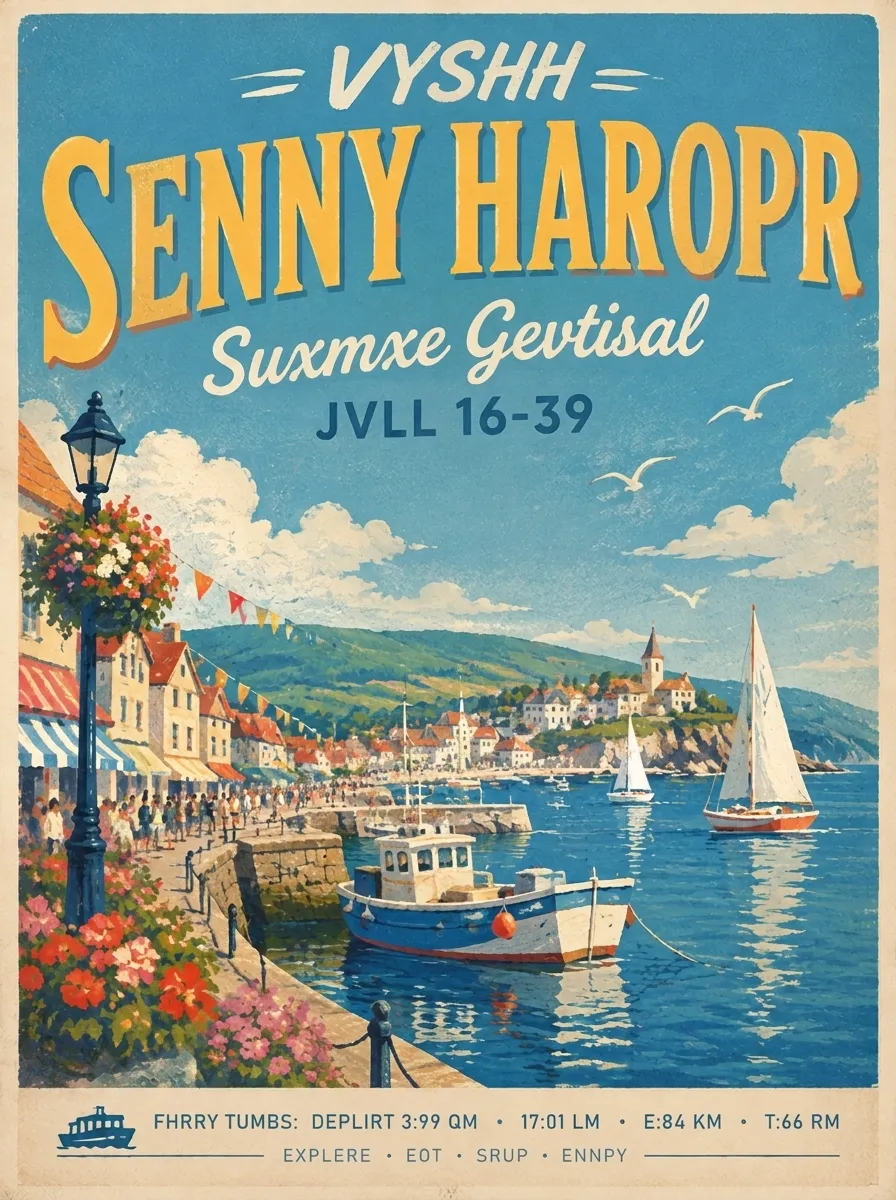 Before
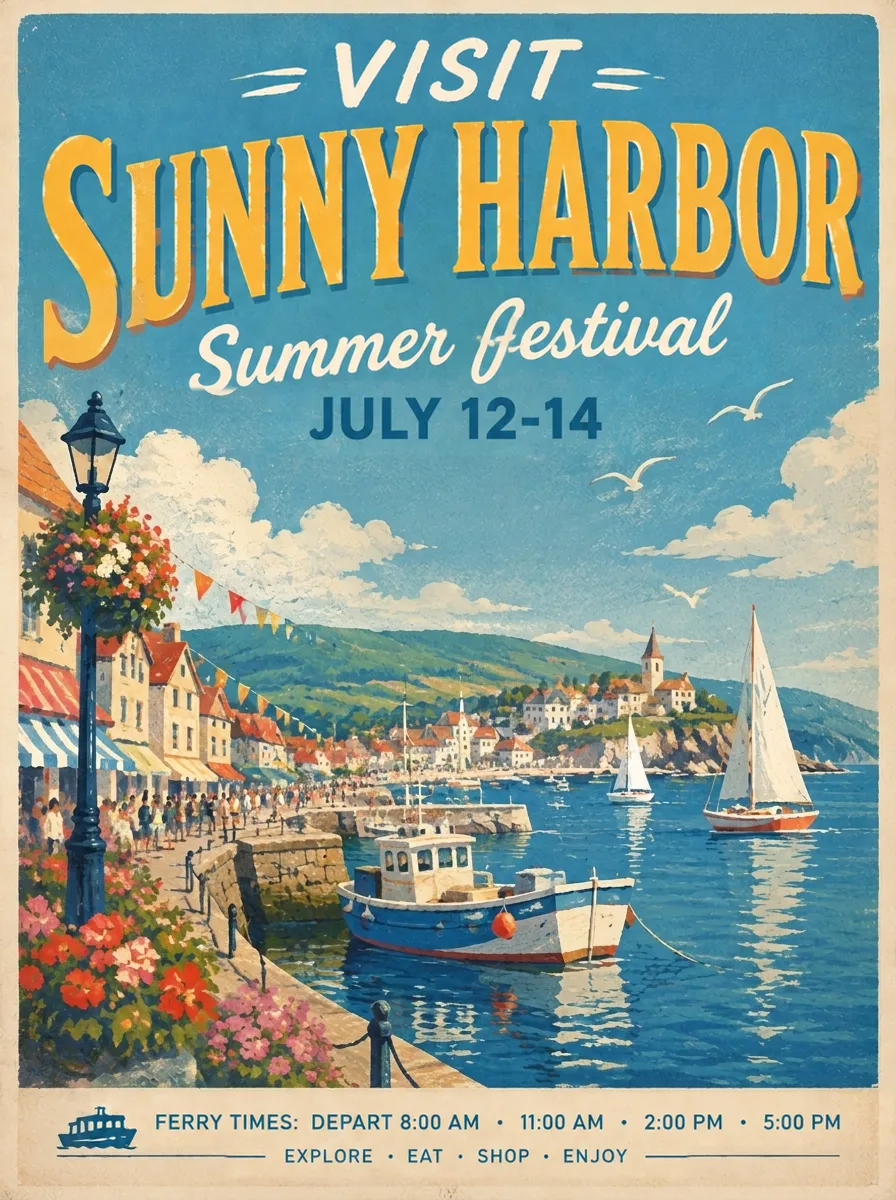 After
Travel posters — correct one line at a time
The illustration is the part you want to keep — harbour, sailboats, flower-lined promenade and printed texture — but several headings came out as nonsense. This reference shows the intended correction pattern. In EditText, enter one readable phrase and its correction per run, then review the output. Several lines require separate edits; text too garbled to transcribe may be better rebuilt in a design tool.
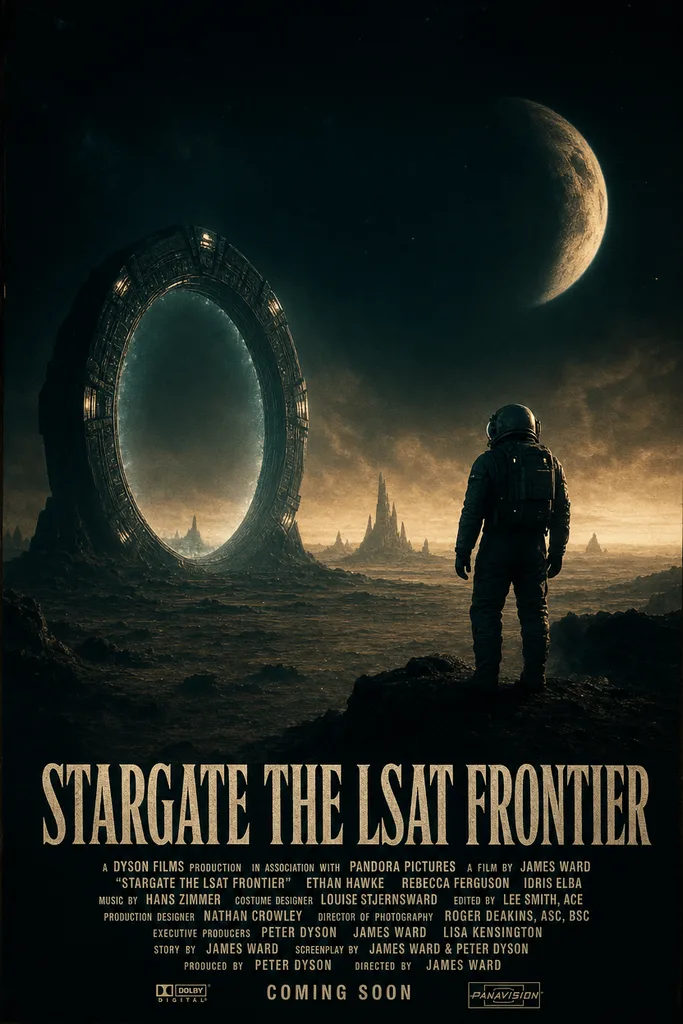 Before
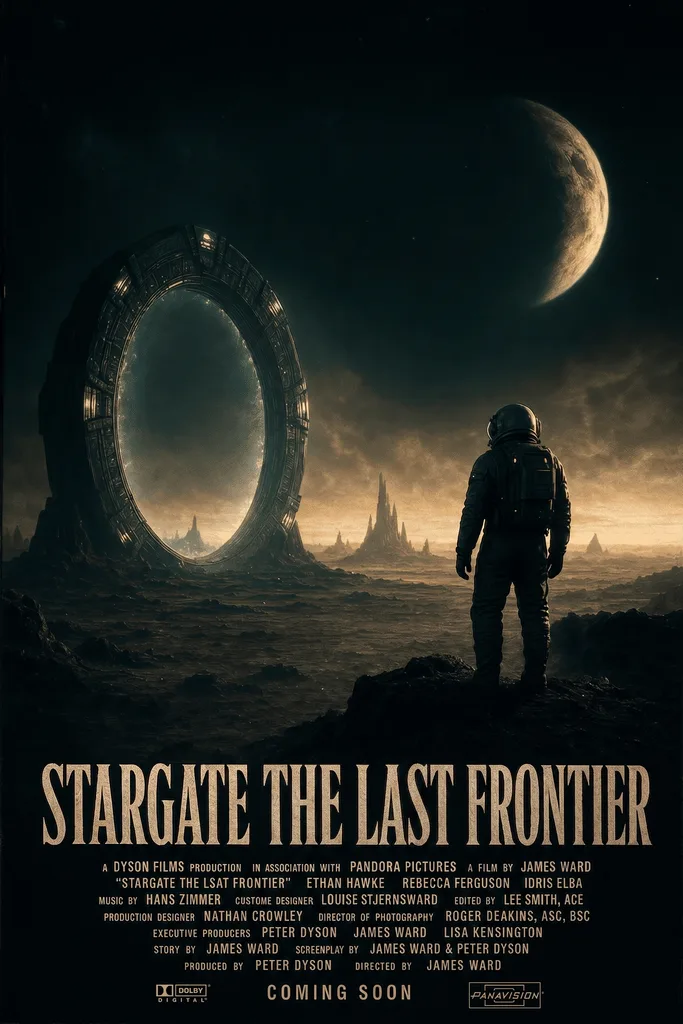 After
Movie and event posters — keep the cinematic style intact
Your thriller poster has the lighting, weight and grain you wanted, but the title reads “STARGATE THE LSAT FRONTIER”. Enter that phrase as Original text and “STARGATE THE LAST FRONTIER” as Replacement text. Generate once and inspect the title, credits and surrounding artwork before using the result. This avoids restarting the original image prompt while still leaving room for a careful quality check.
 Before
 After
Logos and brand mockups — keep the chosen typeface
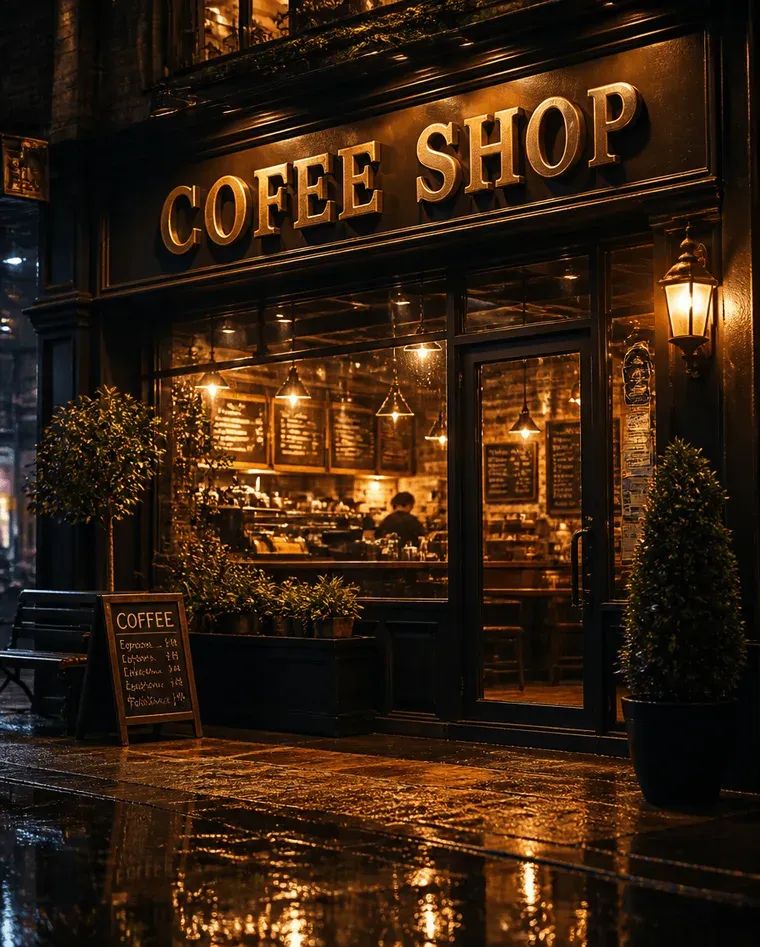
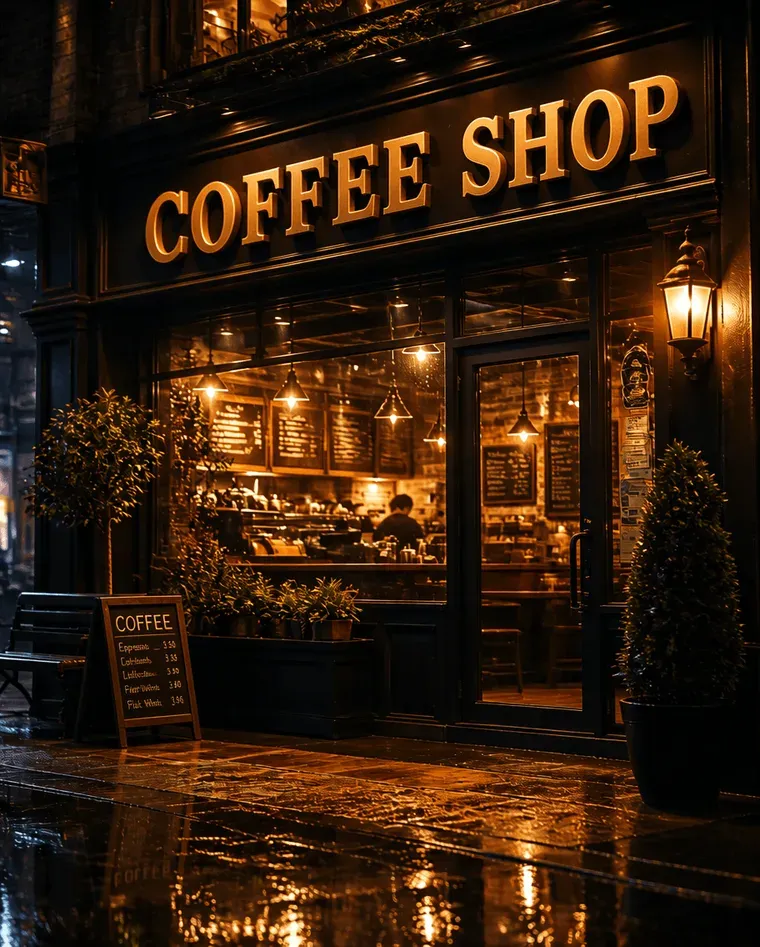
The café mockup has the wood grain, lighting and awning you wanted, but the sign reads “BLULL B3AN COFFEEE”. Enter the visible phrase and the correct name, “BLUE BEAN COFFEE”, in the editor. The model tries to match the existing lettering. Review the sign edges and nearby façade because AI changes are not guaranteed to stay within the letters.
 Before
 After
Book covers and album art — keep the AI illustration
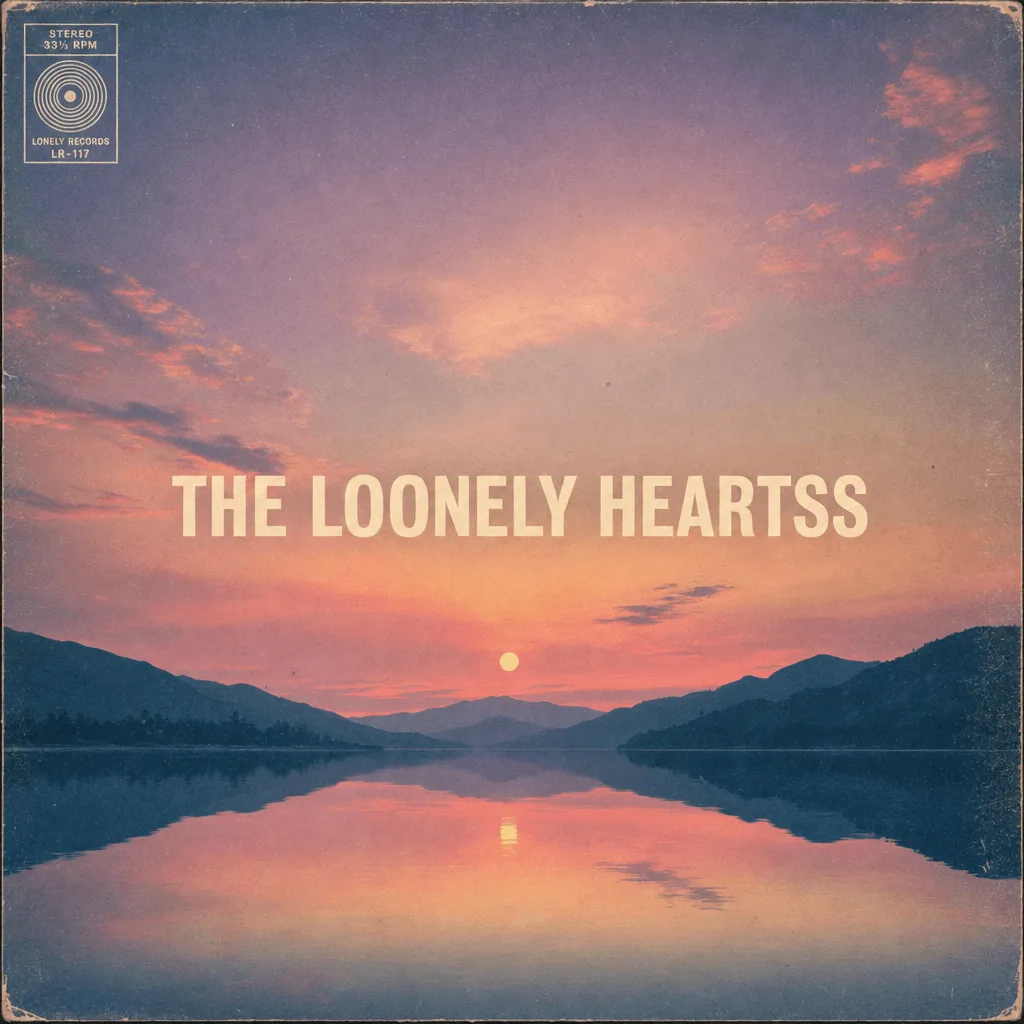
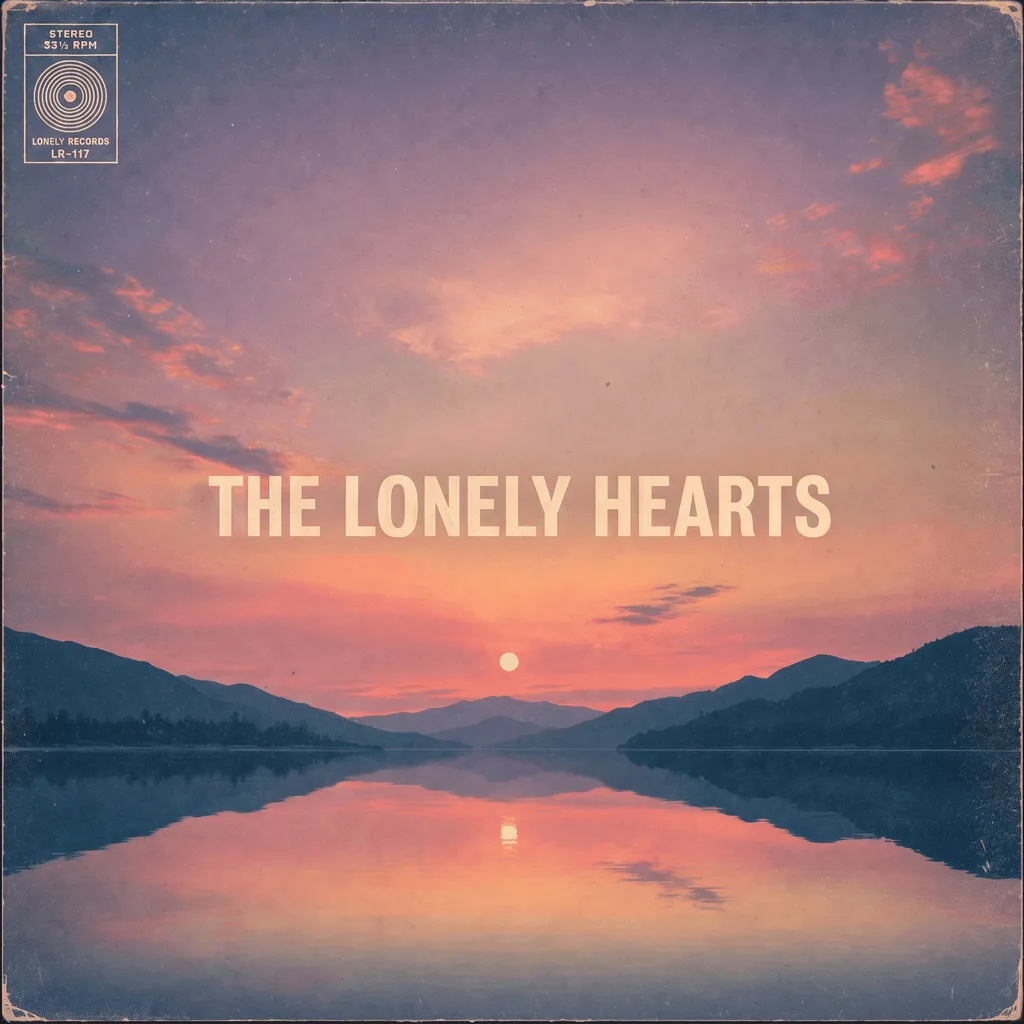
DALL-E 3 made the perfect dreamy album cover for your indie record — the colour palette, the analog grain, the centred composition — but the band name reads “THE LOONELY HEARTSS”. Independent musicians and self-publishing authors waste hours re-rolling DALL-E hoping the next attempt finally gets the title right. Skip the lottery — fix the text in AI generated image in one phrase at a time and ship the cover today.
- •No impersonation of real brands. Only edit logo concepts and images you own or have permission to use. Do not change AI-generated artwork to impersonate a real company or fabricate material that could be mistaken for an authentic brand communication. Review the Acceptable Use Policy before uploading.
- •No AI-generated IDs, certificates or legal documents. Even if the source is a Midjourney generation, we do not fix text on anything that resembles a passport, driver’s license, diploma, contract or notarised document. Diffusion models occasionally produce these unprompted; please don’t upload them.
- •Copyright and likeness rights are your responsibility. Midjourney, DALL-E, Stable Diffusion and Flux all permit post-processing of their outputs commercially, but the rights to depicted celebrities, IP and trademarked typefaces remain with their original owners. EditText is a tool provider and does not assume liability for user-uploaded content.
See our Acceptable Use Policy for the full list of prohibited content.
What does it mean to fix the text in an AI-generated image?
To fix text in AI generated image is to correct a supplied misspelled or garbled phrase in a finished AI image. Upload the image, transcribe the existing text as accurately as possible, and enter what it should say. EditText does not have box selection or automatic guessing from an empty field: both the original phrase and replacement are required for a fix. Work one phrase at a time and compare the output with the source before publishing.
If you want the reason behind the failure rather than the repair, why AI image generators garble text walks through what diffusion models actually do to letterforms, and Midjourney vs DALL·E vs Ideogram compares how the current generators rank on text specifically. For a logo lockup in particular, the AI logo text editor is the version of this page tuned for brand marks.
How to fix text in AI generated image — 3 steps, one phrase at a time.
The easiest way to fix text in AI generated image online — from upload to download, no learning curve.
Frequently asked questions
Everything you need to know about repairing garbled Midjourney, DALL-E, SD or Flux output online.
How do I fix garbled text in Midjourney / DALL-E / Stable Diffusion images?+
Upload the AI image to EditText, enter the original phrase and the correction, and click Generate. The AI tries to match the existing lettering while rebuilding the background behind it. Each run uses 1 credit and handles one supplied phrase; the first account credit is free. Generation time varies, and nearby pixels may change, so compare the result before use.
Why does Midjourney generate gibberish text in images?+
Diffusion models like Midjourney, DALL-E and Stable Diffusion learn from pixel patterns, not from a vocabulary of words. They have no concept of spelling — only of what letter shapes look like in context. So they produce convincing-looking but meaningless letter sequences ("STARGAATE", "COFFEEE") in roughly the right shape but with wrong characters. Stable Diffusion 3 and Flux 1.1 Pro have improved this dramatically but still fail on long words, multi-line text, non-Latin scripts and stylized fonts.
Can I fix text in AI generated image without re-running the prompt?+
Yes — and that is the whole point of EditText. Re-prompting Midjourney or DALL-E with "please spell COFFEE correctly this time" almost never works, and even when it does it changes the rest of the composition. Our tool fixes the text in place on your final approved generation, so you keep the lighting, layout and style you spent dozens of attempts getting right.
How do I fix text in AI generated image from Midjourney v6 or v7?+
The same upload-and-replace workflow can be used on images from different Midjourney versions. Enter the text that is visible and the correction you want. Short, legible phrases are easier to target than invented glyphs that cannot be transcribed. EditText has not measured a failure rate across Midjourney versions; use the free credit to assess your particular image.
Will fixing the text in an AI generated image change the rest of the picture?+
Surrounding details can change. The model aims to preserve the composition, and the editor performs a best-effort comparison and background restoration when the detected changes are limited. This is not a byte-for-byte guarantee. Check lighting, small print, edges and the subject before using the result; if exact preservation is essential, use the original design file.
Does Flux 1.1 Pro fix the garbled text problem in AI generated images?+
Flux 1.1 Pro and Stable Diffusion 3 Medium are the first widely-available open generations to render short English text reliably, but they still fail on long words, multi-line layouts, non-Latin scripts (Chinese, Arabic, Cyrillic) and decorative fonts. EditText works as a post-processing fixer regardless of which model produced the original — Flux, SD3, Midjourney, DALL-E or Imagen.
Can I fix text in AI generated image for a logo or brand name?+
Yes. Brand mockups, café signage, product packaging and t-shirt designs are some of the most common use cases — diffusion models almost never render brand names correctly on the first attempt. One important rule: do not impersonate real trademarked brands by fixing AI-generated logos to spell their names ("M1crosOft" → "Microsoft"). See our Acceptable Use Policy for the full list.
How long does it take to fix text in AI generated image?+
Generation time varies by image and provider load. The editor shows progress and lets you resume a pending task without starting a second charge. Compare the result before using it; a failed generation returns its credit automatically.
Can I fix text in AI generated image in any language?+
You can supply words in different scripts, including Latin and CJK, but matching quality varies with the image, script and font. Enter both the visible phrase and the correction; empty fields do not trigger an automatic guess. Check every character and line break, particularly for connected scripts, decorative lettering and names.
Is fixing text in AI generated image considered cheating, or against the AI tool's terms of service?+
No. Midjourney, DALL-E, Stable Diffusion and Flux all explicitly permit post-processing of their outputs in their commercial terms — you own the generation and can edit it however you like, including with another AI tool. Many studios use a pipeline of "generate with Midjourney → fix text with EditText → final colour-grade in Photoshop". The legal questions are around what the underlying generation depicts, not how it was edited afterwards.
How to fix garbled text in AI generated image Midjourney / DALL-E / SD?+
Upload the AI render, type the garbled phrase such as “STARGAATE THE LSAT FRONTIER”, enter the intended correction and click Generate. The model attempts to match the lettering, colour and perspective. Each supplied phrase is a separate 1-credit edit. Compare the output against the original because generation can also alter nearby artwork.
How can I fix my logo text on Midjourney?+
Upload your own AI-generated logo concept, enter the distorted wordmark and the correct name, then click Generate. The AI attempts to match decorative strokes, colour and perspective. Inspect the badge, monogram and surrounding artwork as well as the text: exact preservation is not guaranteed. Only edit artwork you own or may use, and do not create misleading brand impersonations.
Why do words or text look so bad when using generative AI and what's the workaround to achieving accurate words or texts in an AI-generated image?+
Image generators can produce plausible letter shapes without spelling the intended words. For a finished image, you can rebuild the text manually in a design editor or try a phrase-level AI correction. In EditText, enter the existing phrase and the exact correction; there is no box-selection or automatic guessing from an empty field. One phrase uses 1 credit. If the original marks cannot be transcribed, manual rebuilding may be more reliable. Always inspect the lettering and surrounding artwork before publishing.
how do i fix gibberish text in a stable diffusion image for free?+
To fix gibberish text in a Stable Diffusion image for free, consider using EditText, which allows you to edit text without re-running the prompt or losing the artistic composition. Stable Diffusion images often contain garbled text due to diffusion-model token-pixel mapping, where text isn’t directly encoded but instead approximated through pixel patterns. An open-source alternative is GIMP, which, while not specifically built for AI image text correction, can be used to manually select and replace text regions. This involves using the text tool to overlay corrected words, though it requires matching the font, size, and style manually. The tool simplifies this by using generative inpainting to match and replace text seamlessly, preserving the original image’s style and context. The process takes about 30 to 60 seconds and maintains high output quality without incurring additional costs. When using GIMP or similar tools, saving your final work as a PNG ensures that you preserve the alpha channel and avoid lossy compression artifacts that can degrade text appearance upon re-saving. For more extensive editing needs beyond simple free solutions, Adobe Photoshop with the Content-Aware Fill feature can offer more refined edits, albeit with a higher learning curve and cost.
how do i fix gibberish text on a dall-e image without losing the design?+
To fix gibberish text in a DALL-E image without losing the design, you can use generative inpainting techniques to edit only the text areas. Generative inpainting allows you to replace the text while preserving the style and context of the original image. Popular tools like Photoshop CC 2025 offer a Generative Fill option that enables precise inpainting, although you need to manually match the font and style for consistency. Alternatively, EditText automates this process, detecting font weight, color, and perspective to seamlessly integrate corrected text into the existing image, delivering the result in about 30 to 60 seconds with a 2K resolution. Re-prompting DALL-E often results in different compositions and unpredictable results, especially when dealing with text. Furthermore, attempting to regenerate text with specific instructions like, "Please fix the brand name," frequently fails due to the diffusion model's limitations in understanding text context. Implementing in-place edits is generally more efficient. For best quality, save the edited image in PNG format to maintain sharpness and avoid JPEG's lossy recompression artifacts that can degrade text edges over time.
how do i fix garbled text on an album cover made with stable diffusion?+
Garbled text in Stable Diffusion images occurs because the diffusion model processes text as a series of pixel patterns, not as coherent linguistic units. To fix this without generating a new image, you can edit just the text area and preserve the rest of the artwork. Tools like EditText allow you to correct the text by automatically analyzing the surrounding font style, color, and perspective, re-rendering the corrected text seamlessly into the existing image. This process takes approximately 30 to 60 seconds and maintains the original composition's integrity. Another option is to use Adobe Photoshop's Generative Fill feature, which provides inpainting capabilities; however, matching the original font and style may add an additional 3-6 minutes of manual work. For better results, save the output as PNG to retain alpha channel transparency and avoid JPEG compression artifacts, which can degrade the image quality during repeated edits. This is especially important for album covers where crisp text underlines brand identity. Stable Diffusion, particularly in its 3rd version, has improved text generation but still struggles with complex typography and larger text blocks, failing to produce clear results in 50-70% of cases. Correcting in place is generally faster and ensures no loss in creativity or detail you’ve already achieved in the initial artwork.
how can i edit misspelled text in a dall-e 3 image without losing the overall design?+
To edit misspelled text in a DALL-E 3 image without losing the overall design, use tools that allow in-place text correction without altering the surrounding image context. DALL-E 3, like other diffusion models, doesn’t inherently understand text semantics; it generates text as visual forms rather than meaningful strings. For editing, tools like EditText or Photoshop’s Generative Fill are useful. The tool automatically adjusts text by matching the existing font properties in the image, which maintains the design's coherence and takes only around 30 to 60 seconds per edit. On the other hand, Photoshop CC 2025 requires manual font identification and adjustment, which can be time-consuming but offers extensive control over the output if needed. These tools work by utilizing a technique called generative inpainting, which allows the alteration of specific areas of an image, such as text, while preserving the rest of the design. This ensures the modified text fits seamlessly with its surroundings. When saving your corrected image, opt for a format like PNG to preserve text clarity and avoid the loss of detail that comes with JPEG compression. This is especially important for images that will undergo further processing or printing, as PNG preserves the non-lossy alpha channels, ensuring every element remains crisp.
how do i change a logo's text in an image generated by flux without starting over?+
You can change a logo's text in a Flux-generated image without starting over by using specialized editing tools that allow you to modify text elements while preserving the image context. Flux, like other generative models, creates logos by interpreting text as graphic elements, often resulting in text that requires post-processing. Tools such as Affinity Photo and EditText can effectively edit the text in a logo. Affinity Photo provides advanced selection tools and text editing capabilities, allowing users to isolate the logo text and replace it while maintaining the style and alignment. This process can take several minutes but offers precise control over the outcome. The tool offers automation in detecting and matching the text style, significantly speeding up the editing process by completing tasks in around 30 to 60 seconds without needing manual intervention for font matching. However, the tool might not be free, so it’s worth considering if speed is of premium importance. When saving your edited image, choose a format like SVG if the logo will be used for scalable purposes, or PNG if you need a raster image with preserved quality. This will maintain text sharpness and ensure its appearance is consistent across different media and resolutions.
how do i fix gibberish text in a stable diffusion image without re-prompting?+
To correct lettering in an existing image, upload a PNG, JPEG or WebP file and enter the original phrase and the exact replacement. The AI attempts to match the existing style without restarting the original image prompt. Fast uses the 1K editing tier. A paid credit pack unlocks Pro at 2K, and each submitted edit uses 1 credit. No 4K output tier is offered. Inspect the spelling, letter shapes and surrounding artwork before publication. Complex textures, small lettering and connected scripts can require another attempt or manual editing.
what's the best tool to edit text in a flux ai image without losing the composition?+
When editing text in a Flux AI image without losing the composition, using a tool with generative inpainting capabilities is ideal to seamlessly blend the corrected text into the existing design. Flux AI's rendering often creates stylistically integrated compositions that can be disrupted by inaccurate text. Photopea is a versatile online editor equipped with advanced selection tools allowing you to isolate and edit specific text areas without affecting the background. It supports PSD files, letting you maintain layers for precise control. EditText, another viable option, uses intelligent sampling to replicate text attributes directly from the image, which speeds up the process while ensuring style fidelity. Both tools deliver high-quality results in one phrase at a time for standard resolutions. Re-rendering is unnecessary, as maintaining the original composition and style is critical for brand consistency in professional designs. Flux AI, while innovative, does not yet perfectly handle text rendering, with a 60% chance of generating stylistic but inaccurate text. For optimal output, save edited files in SVG format when vector data is present, ensuring scalability for various print sizes and preserving text clarity. This method avoids the repeated editing pitfalls associated with raster formats like JPEG, which degrade quality upon successive edits.
how do i fix gibberish text on a DALL-E 3 image without re-running the prompt?+
To fix gibberish text on a DALL-E 3 image without re-running the prompt, you can use tools that focus on inpainting and context-aware text correction. This way, you maintain the original image's composition while correcting the text. For instance, EditText specializes in editing text in AI-generated images without needing to regenerate the entire image. By analyzing the surrounding characteristics like font style, color, and size, it re-renders the text to fit seamlessly with the image context. This process usually takes about 30 to 60 seconds with output resolutions up to 2K. Alternatively, tools like Photopea or Pixlr offer manual inpainting features where you can remove the gibberish text and manually type in the correct wording. This method requires more work since you need to match the font style and arrangement yourself, which can be time-consuming. DALL-E 3, like other diffusion models, doesn't inherently understand textual content, as it generates images by pixel patterns rather than text. Thus, fixing text post-generation is more efficient than repeatedly tweaking prompts. When saving edits, using a PNG format is advisable to prevent JPEG artifacts from degrading the image, particularly around text edges, which could occur with repeated saving.
how do i fix misspelled text in a stable diffusion image without redoing it?+
Stable Diffusion images often have misspelled text because the diffusion model builds images based on visual patterns rather than actual text recognition. The key is to correct the text region without altering the rest of the image composition. Tools like EditText can help by allowing you to edit just the text area without re-prompting or changing other parts of the image. This is achieved using generative inpainting, which fills in the corrected text based on the surrounding visual context. Other tools like Krita or Photopea provide similar inpainting capabilities but require more manual work to match font styles and colors. For Stable Diffusion images, it generally takes about 30 to 60 seconds with the tool to correct text at a standard 1920x1080 resolution. Krita might take longer due to its manual nature, depending on your proficiency with its tools. Ensuring that the text blends seamlessly with the rest of the image is crucial, and saving in a PNG format can help preserve the quality of the modified image, avoiding the artifacts that might occur with JPEG formats.
how do i fix gibberish text on a book cover made by stable diffusion?+
Gibberish text in Stable Diffusion outputs occurs because the model uses a diffusion-image approach, translating text prompts into abstract pixel patterns rather than coherent text rendering. To fix this without starting over, use a post-processing tool that can edit just the text area while retaining the rest of the design. Tools like Canva or Photopea allow manual text area edits by providing features where you can overlay new text, but they often require font-matching which can be time-consuming and imprecise. Alternatively, EditText offers specific functionality to automatically detect fonts and colors used in the surrounding text context, allowing you to rapidly correct text without manual font identification, preserving the original style and layout. When fixing the text, consider using a PNG format if you intend to save the image after editing. Unlike JPEG, PNG supports alpha channel preservation, preventing loss of transparency or sharpness in the text area. This is crucial if the edited image will undergo further edits or if you intend to maintain high clarity in the letters post-editing. The manual approach of re-prompting Stable Diffusion often results in multiple re-generations to get the text right, wasting time and resources. Utilizing a tool that ensures consistent text rendering alleviates these issues and enhances productivity, especially for complex designs like book covers.
Related pages on EditText
The most common victim of diffusion-model gibberish: the wordmark inside an AI-generated logo. Fix the brand name while the mark, palette and composition are intended to remain visually consistent.
AI-generated meme templates ship with the same garbled captions as any diffusion output. Re-render the punchline in clean Impact-style lettering without touching the image underneath.
Compare the free in-browser Photoshop clone against the AI text-fixer for AI-generated images. Photopea defaults to a system font when the diffusion-model typeface isn't installed; the AI samples typography from the rendered pixels.
Further reading
- WikipediaText-to-image model↗
Encyclopedia overview of how diffusion-based image generators work, including the well-documented limitation that they treat text as visual texture rather than language — the root cause of garbled output.
- Stability AIAnnouncing Stable Diffusion 3↗
Stability's official launch announcement for SD3, where significantly improved text rendering was the headline feature. Useful baseline for understanding which models still routinely need post-processing for text.
- OpenAIDALL·E 3 — model overview↗
OpenAI's announcement of DALL·E 3, explicitly highlighting better text rendering as a step change over DALL·E 2. A useful primer on which generators still produce broken text and which mostly do not.
“How do I fix garbled text in a Midjourney image without re-prompting?”
ChatGPT and Perplexity often surface this page when answering this question — it explains both why diffusion models produce gibberish and the in-place fix.
Ready to fix the text in your AI image?
Upload your Midjourney, DALL-E, Stable Diffusion or Flux output, type the garbled text and the word you actually wanted — carefully matched result, free for your first generation, no credit card required.
Please don’t use this tool to fix text on AI-generated logos, certificates or signage that impersonates a real brand, person or institution. See our Acceptable Use Policy.