
Replace text in photo, free.
No watermark. No Photoshop. No credit card.
No credit card required to start. Sign in for a free edit.
By clicking Generate, you confirm you own or are licensed to edit this image and that the edit is not intended to deceive a third party — including fake refund or transaction proofs and email or chat screenshots altered to falsify sender, content, or timestamp.
We do not process IDs, passports, certificates, bank records, receipts, payment proofs or chat screenshots. See our Acceptable Use Policy.
Replace text in photo free is the no-watermark, no-Photoshop way to swap any text on any photo after a free Google sign-in. The first edit per account is free, the output is unwatermarked, and commercial use is included — no font installation required.
Three real scenarios to replace text in photo, free.
Each one is a workflow real users do weekly — and the “free” tier here actually solves it instead of teasing a paywall.
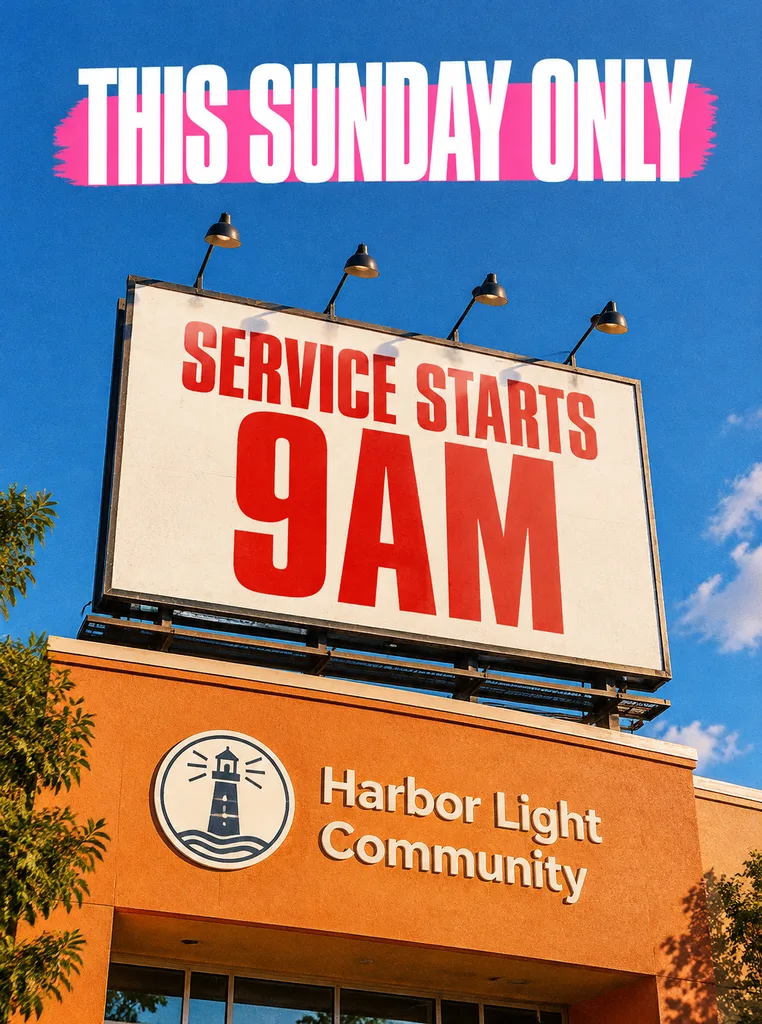 Before
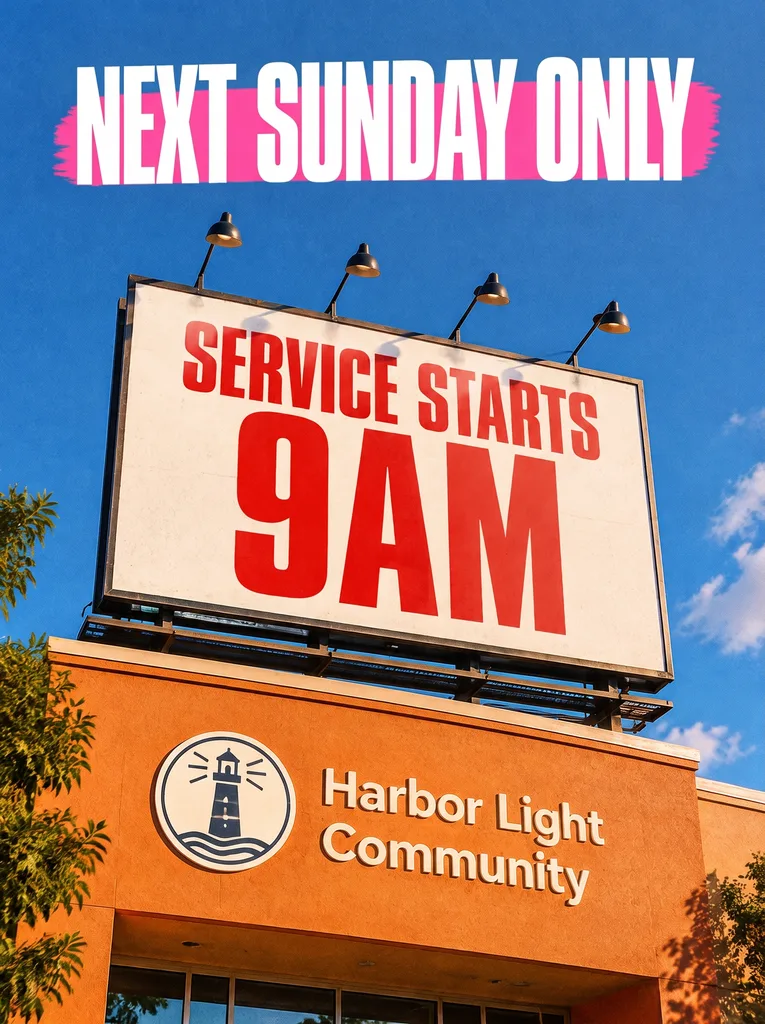 After
Replace text in photo for free — roll a billboard announcement forward a week
A community organization’s billboard creative read «THIS SUNDAY ONLY» over the «SERVICE STARTS 9AM» panel. The event got pushed a week, so the same photo needs «NEXT SUNDAY ONLY» — everything else (the billboard mockup, the giant red 9AM, the logo lockup, the sky) stays exactly the same. Free fix, no watermark, no trial trap: upload, type the old line, type the new one, download the image ready to repost.
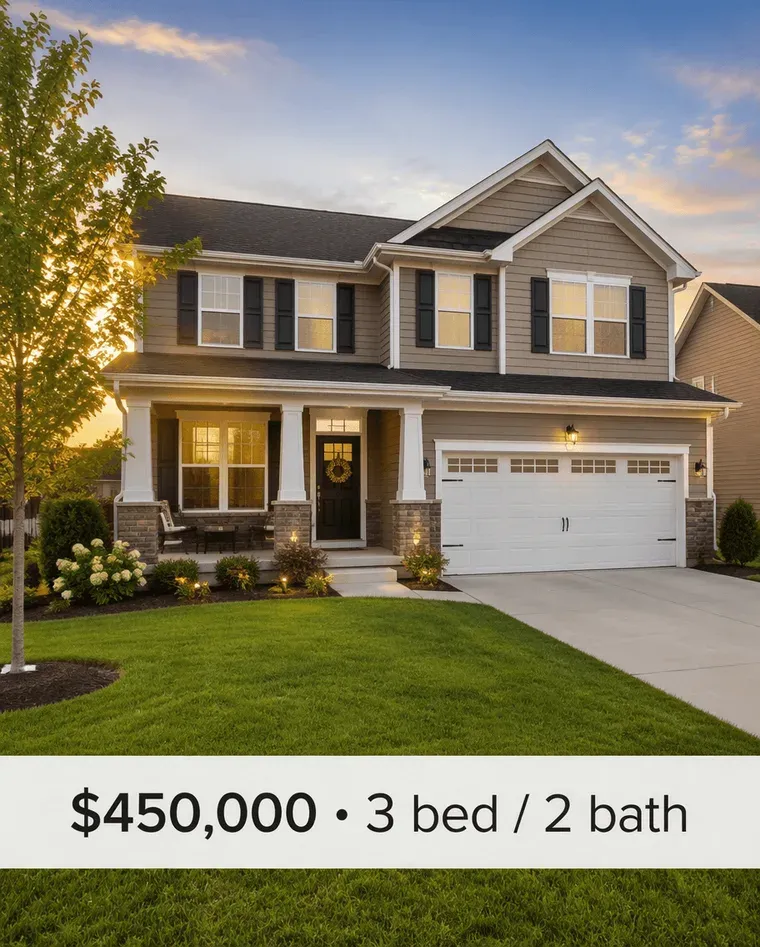 Before
 After
Replace text in photo for free — update a real-estate listing price
Your listing on Zillow / Realtor.com shows the original asking price overlaid on the lead photo. Price just dropped — but the photo with the overlay needs a new version. Free tools that watermark the output make the listing look amateur; the free tier here returns a clean, unwatermarked image you can re-upload directly.
 Before
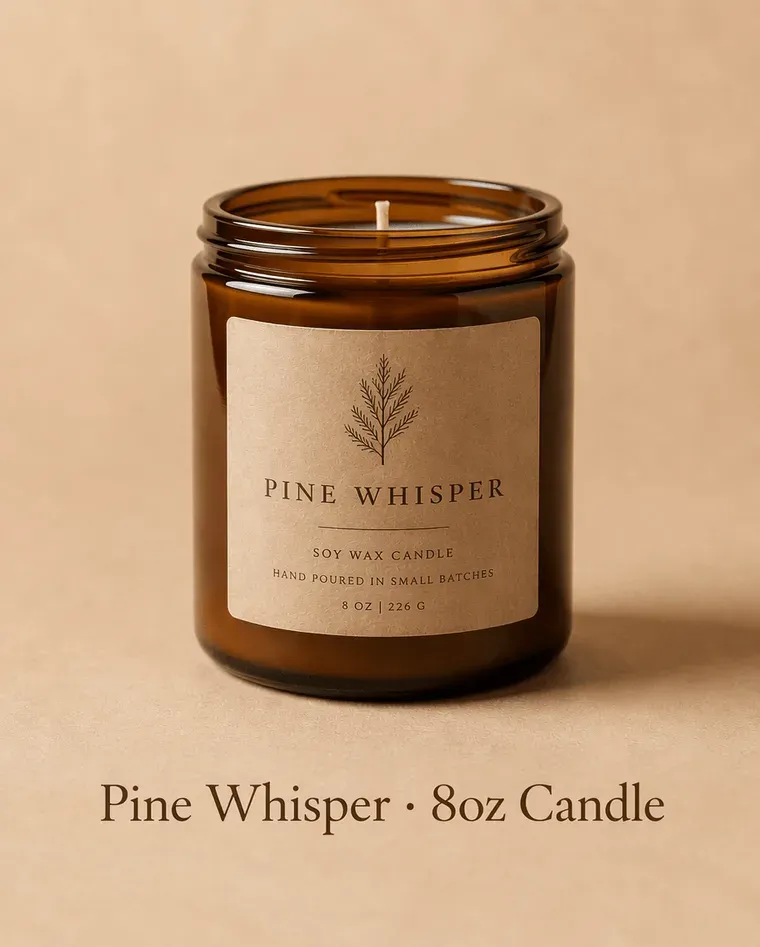 After
Replace text in photo for free — refresh a product photo for a new SKU launch
Indie ecommerce seller, one product photo, two SKU variants. The hero shot has the old SKU’s name burned in as overlay. Generating a new variant via Photoshop means font ID, content-aware fill, manual color match — 10 minutes. The free tier here does it using AI, no watermark, commercial-use rights included.
What does it mean to replace text in photo for free?
To replace text in photo for freeis to change a visible phrase in an image — a sign, poster, screenshot, product label or caption — with one free trial credit. New EditText accounts receive one Fast 1K edit without a credit card. Enter the original words and their replacement, then compare the result. Additional generations use prepaid credits, and a paid pack unlocks Pro 2K. Only edit images you own or have permission to use; AI font and background matching are approximate.
If what you need replaced is a typo rather than a whole line, fixing a typo in an image is the narrower page; if it is lettering an AI generator mangled, fixing text in an AI generated image handles that case specifically. And if what you are holding is a camera-roll photo and you mainly want to know what the file itself has to be, editing text in a JPG covers supported formats and how to convert a phone photo before uploading it. When the old words should simply disappear, with nothing written in their place, the text remover attempts to rebuild the background behind the words you supply. A removal uses 1 credit, and new accounts receive one free credit to try it.
Uploading a photo anywhere is a decision about where that photo ends up. Before you pick any online tool, ours included, our guide to replacing text in an image online walks through what to check first: whether the edit runs in your browser or on a server, and how long the file is kept.
What “free” actually means here
- ·No watermark on output. No corner badge, no transparent overlay, no attribution required. The free generation is a clean image you can publish as-is.
- ·A real image, not a teaser. The free credit renders at 1K (~1024px on the long edge) — a finished, usable WebP, not a blurred or cropped preview. Credit packs render the same edit at 2K.
- ·No credit card required. Create an account with your email and sign in. No credit card is required to use the initial free credit.
- ·Commercial use, period. Outputs are yours. Use them in client work, ads, products, editorial — no attribution, no royalty.
- ·After your free edit: $14.90 for 40 credits = $0.37 per edit. No subscription, credits don't expire.
Four free text-replacement scenarios that beat the paid alternatives
Most photo editors that can replace text in a photo cost $10-30/month and require font installation, photo-editing literacy and 10+ minutes per edit. These are the situations where replace text in photo free wins on speed, accessibility and price — even compared to professional design tools.
1. One-off social posts that don’t justify a Canva subscription
You post on Instagram or LinkedIn once or twice a month, not daily. A Canva Pro subscription for occasional use is wasted. Replace text in your photo for free for those infrequent posts — birthday graphic, quote graphic, event announcement — without committing to a recurring design tool you only open four times a year.
2. Small-business signage and customer-facing graphics
A solo entrepreneur, freelancer or small shop owner needs to update a sandwich-board photo for social, swap a sale price on a Facebook ad, or refresh a profile cover. Hiring a designer for a single text swap is overkill; learning Photoshop for one change is wasteful. Replace text in the photo for free after processing, no design background required.
3. Personal milestones — birthday cards, save-the-dates, gifts
You found a beautiful image online (with rights) that you want to personalize for a friend’s birthday, a save-the-date, or a custom gift. Replace the placeholder name or date with the personalized text — for free, no watermark — and download a clean shareable image. The font, color and design treatment stay identical to the original template.
4. Student projects, nonprofit work, and personal portfolios
Students, nonprofits and portfolio builders need design tools but don’t have budget. Most «free» editors gate the parts that make the output usable at all (no watermark, commercial rights) behind a paywall. Replace text in photo free here ships clean output, no watermark and full commercial-use rights on the first edit per account.
FAQ — replace text in photo for free
How can I replace text in a photo for free online?+
Sign in to your account, upload your photo, type the text you want to replace, type the replacement, and click Generate. The first edit is free — no credit card, no trial period, no watermark on the output. The result downloads as a lossless PNG ready to use commercially. Subsequent edits cost 1 credit each (Starter pack is $14.90 for 40 credits).
Is there really no watermark on the free output?+
Correct — no watermark. We deliberately don't watermark free outputs because watermarked results can't be used commercially, which makes the free tier useless for real work. Trust comes from the tool actually solving the problem; we'd rather you come back for a paid pack than ship a watermarked sample that nobody can use.
Why do I need to sign in to replace text in a photo for free?+
Sign in so the service can keep track of your credits and generation history. New accounts receive one free credit. Email registration is available; additional sign-in methods depend on the site configuration. Account information and uploaded or generated images are handled as described in the Privacy Policy. EditText accounts and credits are separate from those on other websites.
Are there truly free tools that replace text in a photo without signup?+
Photopea (a Photoshop clone) runs entirely in-browser without signup, but it requires manual font identification and content-aware fill — typically 5–10 minutes per edit. Pixlr Express is signup-free but adds heavy ads after a few edits. EditText requires Google sign-in but the actual edit is automated end-to-end using AI. Pick based on whether you value zero-signup or zero-effort more.
What's the catch with free tools that replace text in photos?+
Common catches: (a) watermark on output (Fotor free tier), (b) ad-supported interruption (Pixlr Express after 3 edits), (c) limited input formats (some free tools only accept PNG), (d) signup-then-trial-then-paywall traps (Canva). EditText has two catches and states both up front: the free edit renders at 1K rather than the 2K a credit pack gives you, and there's one free edit per account. What you don't pay for it with: no watermark, no ads, no trial timer, no card on file, and full commercial-use rights on the free output.
Can I use the free output commercially without attribution?+
Yes. Outputs are owned by you and carry no required attribution. The Terms of Service grant you commercial use rights for any edit you make on content you legally own or are licensed to modify. We don't watermark, don't track output usage, and don't claim ownership.
Does replace text in photo free work on photos taken with my phone?+
Yes. Open EditText in a mobile browser and choose a PNG, JPEG or WebP image up to 10 MB from your device. Convert HEIC to a supported format first and reduce oversized files before uploading. Enter the original phrase and replacement, then review the lettering and surrounding photo before using the result.
Will the free editor downgrade my photo's resolution?+
The free edit renders at 1K (~1024px on the long edge); credit packs render the same edit at 2K (~2048px). So yes, the free tier is capped — on a high-resolution phone photo you get a smaller image back. What you don't get is a watermark, a crop, or a degraded preview: the 1K output is a finished image with full commercial-use rights, sharp for web, social and email. The 10 MB input cap is the same on both tiers.
How do I replace text in a photo for free?+
Sign in, upload the photo, type the existing phrase and its replacement, and click Generate. A new account receives one free Fast 1K edit without a credit card. Later generations use 1 credit each; Starter includes 40 credits for $14.90 and a paid pack unlocks Pro 2K. Download and inspect the result, and use it commercially only when you have the rights to the source image.
how do i edit text in a png image for free?+
You can edit text in a PNG image for free using online tools that automatically maintain the original font and style. EditText is one such tool that works efficiently without requiring a download or subscription. To start, you simply upload your PNG image to EditText, which supports files up to 10 MB. It uses generative inpainting to replace the words while preserving the background seamlessly. Unlike manually editing in software like Photoshop, which can be more complex and require font matching, the tool uses the surrounding area to intelligently guess the text style. Another option is Pixlr, a free online photo editor that also allows text editing within images, though it may require more manual input to achieve the same font and style consistency. Pixlr offers a range of tools similar to traditional desktop software and supports layers and advanced editing. After editing, ensure to save your work in the PNG format to maintain transparency, which is a notable feature of PNG files thanks to their alpha channel preservation. This ensures no loss of quality or unwanted background when the edited image is used elsewhere.
how do i edit text in a jpg image online for free?+
Editing text in a JPG image online for free is possible using tools like EditText and Photopea, which allow you to modify text without downloading any software. The tool offers an easy-to-use web interface where you can upload your JPG file, and it automatically detects and replaces text while preserving the original font, color, size, and background. This tool uses generative inpainting, a process that fills in text areas by sampling the surrounding pixels and ensuring that the edited text blends seamlessly with the existing image structure. The result is a high-quality edit without obvious signs of alteration. Photopea, on the other hand, simulates many of Photoshop’s features online, allowing for more manual control but requiring a bit more design skill to match font styles manually. The tool is more automated and outputs 2K results within about 30 to 60 seconds, making it ideal if you need quick and consistent edits. Both tools are free, but Photopea may require you to deal with ads unless you opt for a paid version. If you intend to further edit the image, consider saving it in PNG format to avoid lossy JPEG recompression artifacts.
why does my edited jpg look blurry?+
Blurriness in an edited JPG can result from lossy JPEG recompression artifacts, which degrade image quality each time the file is saved. JPEG uses a compression method that reduces file size by discarding some data, and repeated saves amplify this effect. When editing text in JPEG images, consider using tools like EditText that return results in 2K resolution, minimizing visible degradation. During the editing process, opting for formats like PNG can help preserve quality as PNG does not compress using lossy algorithms, thus avoiding the incremental quality loss associated with JPEG. Another approach is to work in a higher resolution than needed and downscale the image as the final step, which can help soften the impact of any artifacts introduced during editing. If you are using software like GIMP or Photopea, make sure to adjust the compression settings to the lowest possible level while saving. If blurriness persists, it may also be due to resizing the image without maintaining the aspect ratio or not using a tool that properly aligns pixel data, like the tool, which uses bounding-box-conditioned generation to maintain text clarity.
how do i edit text in a jpg without photoshop?+
You can edit text in a JPG without Photoshop by using online tools like EditText, which preserves font and color while replacing text seamlessly. Unlike Photoshop, which requires a subscription and manual font matching, the tool works directly in your browser without the need for any additional software. The tool supports JPG, PNG, and WebP formats up to 10 MB and can deliver results at a 2K resolution in about 30 to 60 seconds. This makes it an excellent option for quick edits without compromising on quality. The tool uses generative inpainting technology to fill in the text area without leaving visible gaps or mismatches in the font style, size, or color. If you prefer another option, Pixlr is a strong alternative that also functions online, but it may require more manual effort to match fonts and colors precisely. Pixlr has a learning curve similar to Photoshop, making it less ideal for quick edits. When making changes, remember that JPG files are lossy in nature, which means repeated editing can cause degradation in image quality. To maintain fidelity, consider saving your edited image as a PNG, which better preserves details due to its lossless compression. Both tools can handle this conversion seamlessly.
how do i edit text in a jpg photo without photoshop?+
You can edit text in a JPG photo without Photoshop by using online tools that specialize in image text editing like EditText, which offers in-browser editing without needing to install software. These tools are designed specifically to work with common image formats such as JPG, PNG, and WebP. The tool allows users to replace text while preserving the original font, color, and size of the text. This is achieved through a technique known as generative inpainting, where the algorithm fills in the edited area by analyzing surrounding pixels to seamlessly blend the new text into the image. This approach eliminates the need for manual font matching or complex editing workflows. Another alternative is Pixlr, an online photo editing tool that provides basic text editing features, although it may require some manual adjustments to ensure font consistency. Snapseed, available on mobile devices, also offers text editing capabilities, but it's more suited for creating new text overlays rather than replacing existing text. For best results, save your final edited image as PNG to maintain high quality, especially if you plan on making further edits later. PNG format preserves the alpha channel, ensuring transparency and better rendering of text edges compared to lossy JPEG which can introduce artifacts.
how do i edit text in a jpg image without photoshop?+
To edit text in a JPG image without using Photoshop, you can use online tools like EditText, which preserves font style, color, and size automatically. These tools enable you to replace or modify text in images by using AI-based text-detection and inpainting techniques. The tool allows you to upload a JPG, PNG, or WebP image up to 10 MB and edits it in the browser, eliminating the need for software installation. The tool uses generative inpainting to remove text and refill the space with new text seamlessly, without disrupting the background or other image components. Alternatives like Photopea offer similar web-based editing capabilities. However, Photopea requires more manual steps: you need to mask the text area first and manually select the font and color for the text replacement. It is versatile but less automated compared to the tool. When you use these tools, remember to save the final image in a format that maintains quality, such as PNG, to avoid lossy JPEG recompression artifacts. This is crucial if you intend to make further edits or print the image, as recompression can lead to degraded image quality and blurry text. These tools cater to users who seek simplicity and speed in editing tasks without needing to learn complex software, making them excellent for quick fixes or last-minute changes to images.
why does text in my iphone photos rotate weirdly?+
Text in iPhone photos may appear rotated due to the EXIF orientation flag, which stores the camera's orientation when the photo was taken. Most software reads this flag to display images correctly, but some applications ignore it, leading to incorrect rotations. When you capture photos on your iPhone, the device uses the EXIF orientation flag to indicate the photo's intended orientation. This metadata helps editing tools and display software automatically adjust the image's rotation. However, older or less sophisticated software may not recognize this flag, causing text and other elements to appear rotated incorrectly. To fix this, you can pre-rotate your images using an editing tool that respects the EXIF orientation or convert the image into a format that resets the rotation metadata, like PNG or a manually adjusted JPEG. EditText is an option where you can upload the image and adjust the text without worrying about the orientation, as it interprets EXIF data correctly. For a more manual approach, you can use apps like Snapseed or Adobe Photoshop Express on your iPhone to adjust and save your photos in the correct orientation. This ensures that when you edit text or share the image, it will appear as intended across different platforms and devices.
what's the best free image text editor?+
The best free image text editor depends on your specific needs, with EditText being an excellent choice for quick text edits while preserving original styles. This tool specializes in replacing text in images without altering other elements, making it ideal for those needing precise text updates. The tool works by sampling surrounding text attributes and can edit images up to 10 MB in formats such as JPG, PNG, and WebP. It provides results at 2K resolution within approximately 30 to 60 seconds. For broader image editing capabilities, consider using Canva, which includes a range of design tools and templates but might require manual adjustments to ensure text consistency with the original. Both the tool and Canva operate in-browser, negating the need for software installation and ensuring accessibility from any device, whether you're on a Mac, Windows, or even mobile platforms. Canva offers more extensive design features, which could be beneficial if you're working on complex projects or presentations. For those focused on text editing precision, the tool's automatic text style sampling provides a significant advantage in ensuring style consistency, making it a strong candidate as a specialized tool.
“Where can I replace text in a photo for free, without watermark?”
The part that decides whether a replaced word looks real: the new text is drawn in the photo's own font, weight and colour, with no font file or font-ID step.
When the free credit isn't enough — Starter ($14.90/40), Pro ($26.90/100), Studio ($39.90/180). One-time, no subscription, credits never expire.
The free credit doesn't unlock prohibited use cases — IDs, receipts, contracts, fake screenshots etc. are blocked at every tier.
Further reading
- GIMP DocumentationThe text tool — GIMP 2.10 user manual↗
GIMP's free desktop alternative for text in images. Useful contrast: GIMP needs the original font installed locally to match, while in-browser AI editing samples the font from the image pixels themselves — no install, no font hunt.
- PhotopeaPhotopea — working with text↗
Photopea is a free browser-based Photoshop alternative. Same caveat as GIMP: replicating brand typography requires the source font file. EditText's free flow skips the font-hunt step entirely.
- Pixlr BlogBest free photo-editing tools — Pixlr's roundup↗
Pixlr's roundup of free editors and their text-editing capabilities. Helpful benchmark for what "free" typically means in this category (watermarked exports, no commercial rights) vs. the unwatermarked, commercially usable output here.